60 lines
1.9 KiB
Markdown
60 lines
1.9 KiB
Markdown

|
# birdcage-tui
|
||
|
|
|
||
|
|
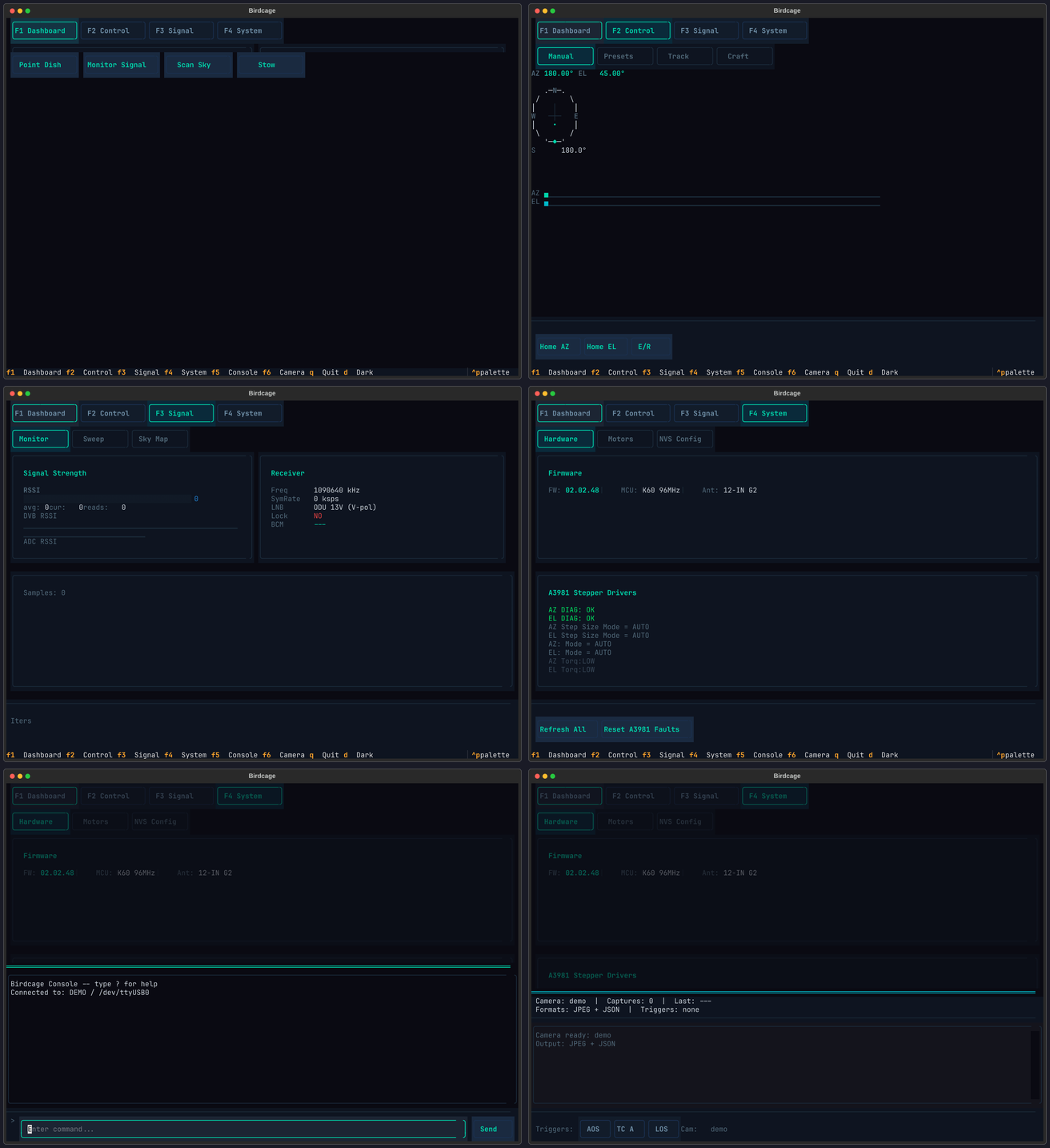
Terminal UI for controlling Winegard satellite dishes. Built on [Textual](https://textual.textualize.io/) with six screens covering everything from manual pointing to live satellite tracking.
|
||
|
|
|
||
|
|
Try it without hardware:
|
||
|
|
|
||
|
|
```bash
|
||
|
|
uvx birdcage-tui --demo
|
||
|
|
```
|
||
|
|
|
||
|
|
## Install
|
||
|
|
|
||
|
|
```bash
|
||
|
|
pip install birdcage-tui
|
||
|
|
|
||
|
|
# With camera capture support (JPEG annotation, FITS export)
|
||
|
|
pip install birdcage-tui[camera]
|
||
|
|
```
|
||
|
|
|
||
|
|
## Screens
|
||
|
|
|
||
|
|
| Key | Screen | What it does |
|
||
|
|
|-----|--------|-------------|
|
||
|
|
| F1 | Dashboard | Live AZ/EL readout, compass rose, motor status, signal gauge |
|
||
|
|
| F2 | Control | Manual jog, satellite presets, Track mode (rotctld), Craft mode (live TLE) |
|
||
|
|
| F3 | Signal | RSSI bargraph, azimuth sweep plot, sky heatmap |
|
||
|
|
| F4 | System | NVS editor, firmware ID, motor dynamics, PID tuning, A3981 diagnostics |
|
||
|
|
| F5 | Console | Raw serial terminal to the dish firmware |
|
||
|
|
| F6 | Camera | Capture overlay with multi-trigger pipeline (requires `camera` extra) |
|
||
|
|
|
||
|
|
The collage below shows all six screens. On PyPI this image may not render -- see the [TUI guide](https://birdcage.warehack.ing/guides/tui/) for full screenshots.
|
||
|
|
|
||
|
|
|
||
|
|
|
||
|
|
## Usage
|
||
|
|
|
||
|
|
```bash
|
||
|
|
# Demo mode (no dish required)
|
||
|
|
birdcage-tui --demo
|
||
|
|
|
||
|
|
# Connect to hardware
|
||
|
|
birdcage-tui --port /dev/ttyUSB0 --firmware hal205
|
||
|
|
|
||
|
|
# Carryout G2 at 115200 baud
|
||
|
|
birdcage-tui --port /dev/ttyUSB2 --firmware g2 --baud 115200
|
||
|
|
```
|
||
|
|
|
||
|
|
## Documentation
|
||
|
|
|
||
|
|
Detailed screen walkthroughs and configuration: **[birdcage.warehack.ing/guides/tui](https://birdcage.warehack.ing/guides/tui/)**
|
||
|
|
|
||
|
|
## Credits
|
||
|
|
|
||
|
|
- **Gabe Emerson (KL1FI / [saveitforparts](https://github.com/saveitforparts))** -- original Winegard rotor scripts
|
||
|
|
- **Chris Davidson ([cdavidson0522](https://github.com/cdavidson0522))** -- Carryout G2 sky scan and rotator control
|
||
|
|
|
||
|
|
## License
|
||
|
|
|
||
|
|
MIT
|